Oakland San Francisco Bay Airport Terminals
Information compiled by David Enrich, aviation and airport guide expert since 1999.
Oakland International Airport (OAK) features two passenger terminals designed for efficiency and ease of use. Thanks to its compact layout and modern upgrades, the airport offers short walking distances, quick connections and a stress-free experience compared to larger hubs in the Bay Area.
History & Origins
Oakland Airport was established in 1927 and quickly became an important aviation hub on the U.S. West Coast. The airport entered the jet age in 1962 with the opening of Terminal 1, followed by Terminal 2 in the 1980s to accommodate growing passenger demand. Over the years, OAK has undergone several modernization projects, including expansions, improved security areas and new passenger facilities.
OAK has a long aviation history and was once one of the most important departure points for Pacific flights.
Terminal 1
Terminal 1 is the main terminal handling a wide range of domestic and some international flights.
- Ground level: baggage claim, arrivals and check-in
- Upper level: security and departure gates (1–17)
- Facilities: restaurants, shops, lounges
- Connection: linked airside to Terminal 2
Terminal 1 offers more airline variety and is ideal for international departures.
Terminal 2
Terminal 2 is mainly used by Southwest Airlines and features a more streamlined layout with modern passenger amenities.
- Gates: 20–32
- Layout: central security with direct access to all gates
- Facilities: dining areas, shops and seating zones
Terminal 2 is usually faster and less crowded, making it ideal for quick departures.
Airport Terminal Map
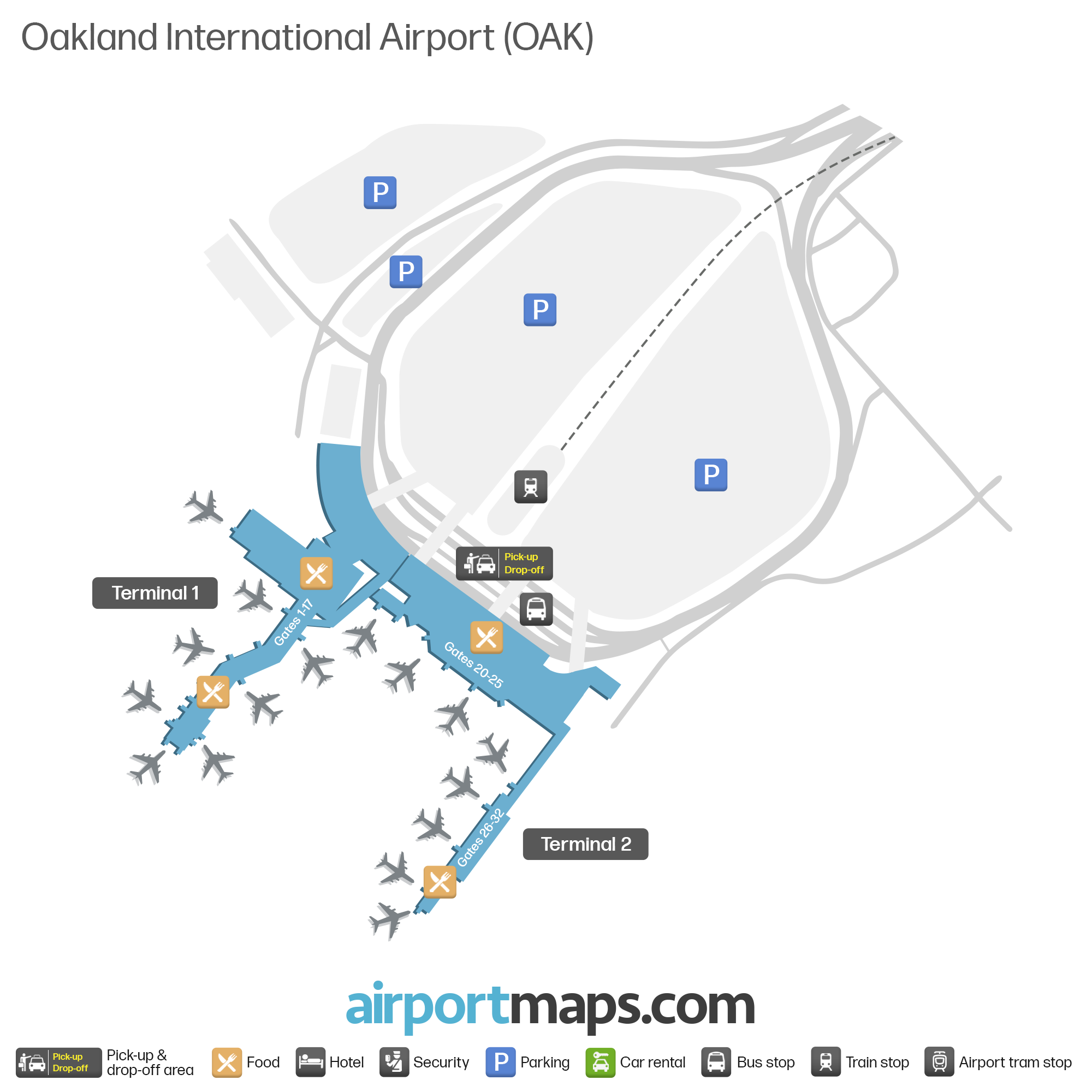
Both terminals are connected after security, so transfers are quick and do not require re-screening.
Facilities & Services
- Free Wi-Fi across all terminals
- ATMs and payment services
- No luggage storage available
- Charging stations throughout gates
- Pet relief areas and nursing rooms
Bring a power bank—charging spots can fill up during busy periods.
Family & Accessibility Services
- Baby care / nursing rooms (T1 near Gate 4, T2 near Gate 26)
- Wheelchair assistance via airlines
- Accessible restrooms and elevators
Request mobility assistance at least 48 hours before your flight.
Security & Baggage Control
Each terminal has its own TSA security checkpoint, usually opening about 90 minutes before the first flight.
Average security wait times are short compared to other Bay Area airports.
Lost & Found
The Lost & Found office is located in Terminal 1. Items lost at security must be handled by TSA, while items lost onboard aircraft must be reported to the airline.
Act quickly—lost items are easier to recover within the first 24 hours.
Check-in & Boarding
- Check-in opens 2 hours before domestic flights
- Boarding starts 30–45 minutes before departure
- Self check-in kiosks available
Arrive early during peak travel seasons despite generally fast processing.
Popular Routes from OAK
Estimated Airport Times
OAK is one of the fastest airports in California—ideal if you want to avoid long queues.
The San Francisco Bay Area is served by three major airports: Oakland (OAK), San Francisco (SFO) and San Jose (SJC).
Choosing the right airport can save you time and money.